
How Do You Implement Salesforce CRM Successfully?
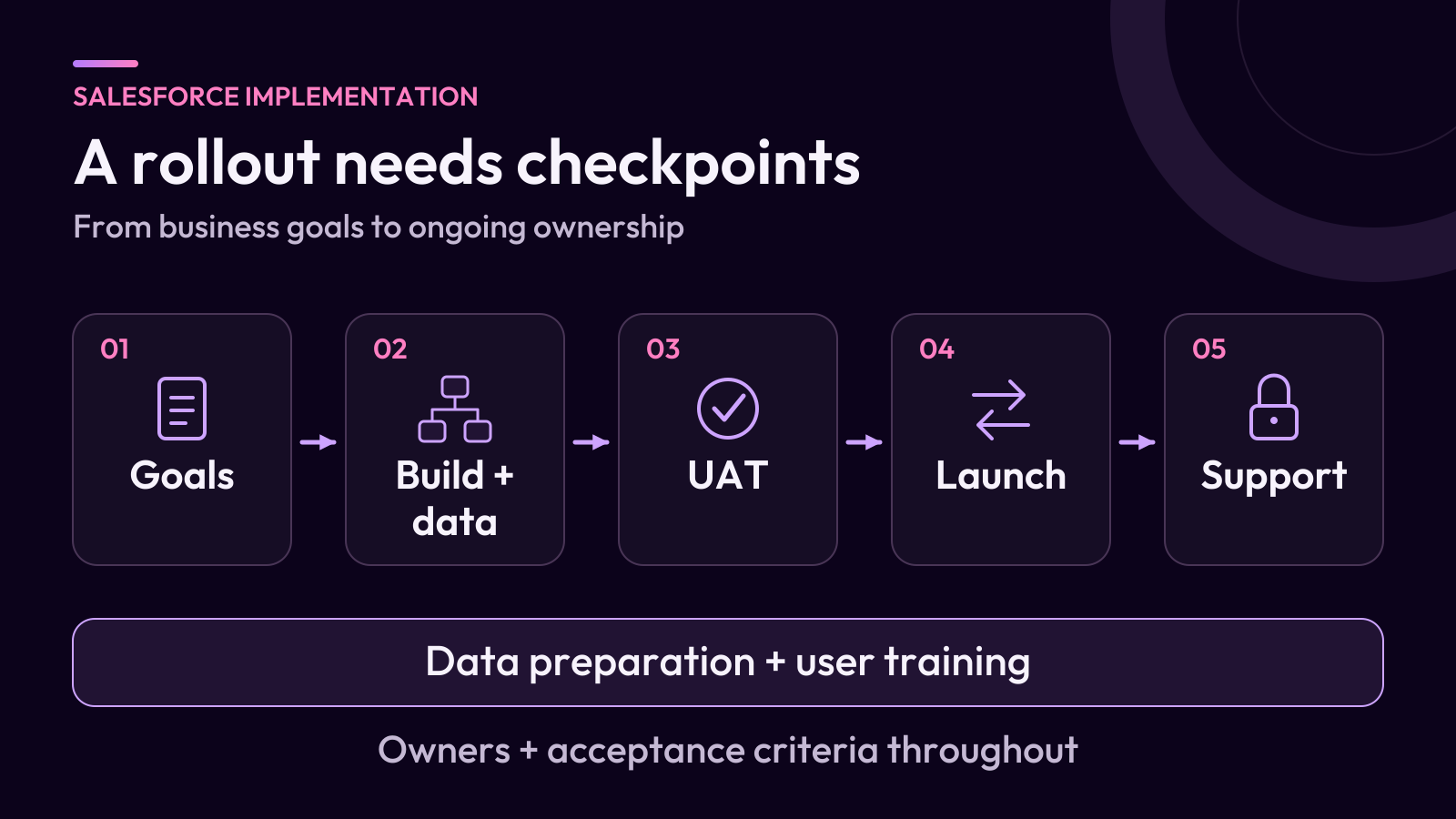
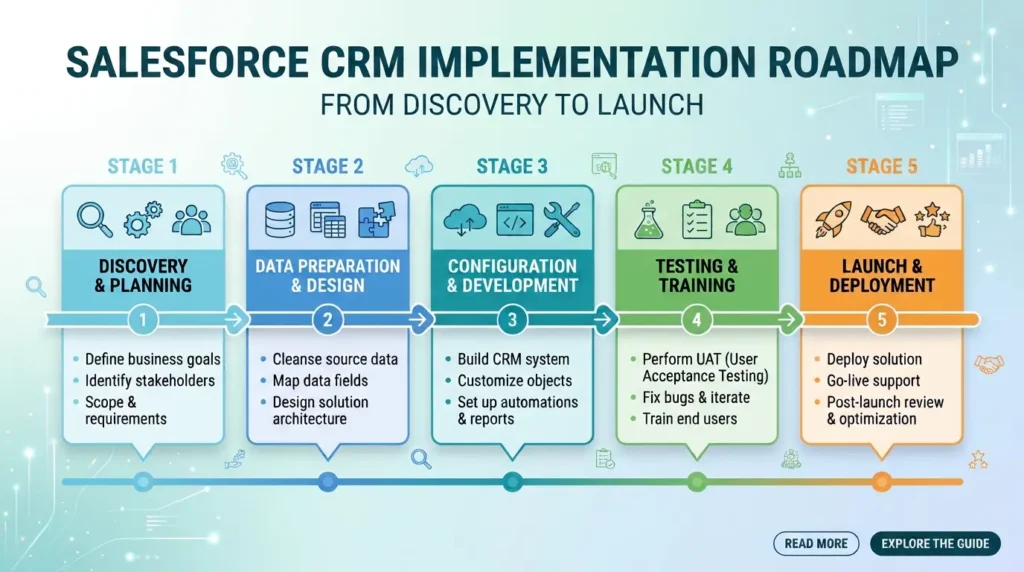
Implement Salesforce by defining business goals, mapping how work moves between teams, configuring the CRM, preparing data, connecting essential systems, testing real tasks and training users before launch. Give each decision a clear owner, then measure whether people can complete their work after go-live.
If you are working out how to implement Salesforce, start with the business process your team needs to improve. A sales manager needs a pipeline they can trust. A representative needs to know which lead to contact next. Your implementation should make those tasks easier to complete and easier to measure.
This guide explains the process through a first sales CRM rollout. Service operations, industry products and projects involving several Salesforce clouds need additional design around their specific requirements.
What Is Salesforce Implementation?
Salesforce implementation is the process of turning Salesforce into a working CRM for your organization. It brings together business requirements, system configuration, data migration, integrations, testing, training and ongoing administration.
Buying licenses gives your team access to the platform. Implementation establishes what information belongs in it, who can access that information, which actions happen automatically and how managers measure results.
For example, a sales team might need Salesforce to capture inquiries, assign leads, track opportunities and show a consistent forecast. The implementation must connect those activities into a process people can follow, including exceptions such as an unassigned lead or a deal that moves backward.
An end-to-end implementation covers the journey from discovery through launch and support, rather than stopping after the system has been configured.
What Information Is Required Before You Implement Salesforce?
Prepare a short discovery pack before configuring fields or importing records. It should explain how the business works today and what the first release must accomplish.
Gather:
- Business priorities: the problems you want to solve and the measures you will use to judge progress.
- Current workflows: how a lead becomes a customer, who handles each handoff and where work gets delayed.
- Users and access needs: job functions, reporting responsibilities and information that needs restricted access.
- Data samples: exports showing actual fields, duplicates, missing values and relationships between records.
- Connected systems: email, finance, website forms and other applications that exchange customer information.
- Delivery constraints: budget, decision makers, team availability and dates when business disruption would be difficult.
Name an executive sponsor who can resolve competing priorities and an internal CRM owner who can make daily decisions. Salesforce’s guidance on preparing for adoption and securing executive alignment supports involving stakeholders before the build begins.
How Do You Plan A Successful Salesforce Implementation In Nine Steps?
Use the following steps as a sequence of decisions and checks. Some work, such as data preparation and training, should continue across several stages.
1. Which Business Outcomes Should The CRM Deliver?
Choose a small set of outcomes that the first release can demonstrate. Make each outcome specific enough to test.
For example:
- Lead follow-up: measure the time between an inquiry arriving and a representative recording the first response.
- Pipeline visibility: measure how many open opportunities have an owner, an agreed stage and a current next action.
- Reporting effort: record how long managers spend assembling the weekly sales report.
Capture a baseline before launch. Agree how each measure is calculated, who owns it and when you will review it. Any improvement target should come from your business needs and starting position, rather than an assumed industry benchmark.
This also helps you prioritize requests. A new field should support a decision, a task or a reporting requirement. If nobody can explain its purpose, defer it until that purpose is clear.
2. What Should Your Implementation Project Plan Include?
Your Salesforce implementation project plan should identify scope, deliverables, owners, dependencies and acceptance criteria for each phase.
Define the smallest useful first release. One team might need lead assignment, opportunity stages and three management reports. Another might need case routing before expanding into sales processes.
Confirm the product, edition, licenses, integration capabilities and test environments required for that scope. Document which features are deferred and how changes to scope will be approved.
Assign responsibility for business decisions, configuration, data quality, integration work, testing and launch approval. One person may hold several roles in a small company, but each responsibility still needs an owner.
If teams disagree about priorities, resolve that before building. iTeknologies’ approach to CRM strategy and process mapping provides context for turning competing requirements into a documented roadmap.
3. How Should You Design Your Salesforce Data Model?
Design the data model around the information your team needs to manage and report on. In Salesforce, objects hold records and fields hold details about those records.
For a typical business sales process, Accounts represent organizations, Contacts represent people and Opportunities represent potential deals. Leads can support the handling of prospects before qualification. Salesforce’s introduction to standard and custom objects explains the distinction.
Check whether standard objects and fields already meet the requirement before adding custom ones. Document each custom field’s meaning, allowed values, owner and reporting use.
Agree on stage definitions with users. “Qualified” should mean the same thing to a representative, a manager and the person building the dashboard. Avoid creating a second way to record the same information without a clear reason.
4. How Do You Configure Access, Screens And Automation?
Configure access for the tasks people need to perform. Use permission sets and permission set groups to organize relevant permissions, and design record visibility separately through the appropriate sharing controls.
Someone who can edit opportunities should not automatically have access to every opportunity in the company. Salesforce’s record-level security guidance explains how object permissions and record sharing work together. Test access using representative user accounts.
Next, simplify the screens people use most. Keep frequently needed fields visible and apply validation rules where missing or inconsistent information would cause a business problem.
Automate an agreed process after its decisions and exceptions are clear. Salesforce Flow can handle many straightforward tasks, such as creating follow-up work or updating records. Complex logic or demanding transaction volumes may require Apex or a combined design. Use Salesforce’s record-triggered automation decision guide to inform that choice.
Build and test changes in a suitable non-production environment. Keep a record of what each automation does, what triggers it and who maintains it.
5. How Do You Prepare And Migrate Your CRM Data?
Clean and map your source data before loading it. Decide which records belong in the new CRM, remove confirmed duplicates and agree how missing values will be handled.
Create a mapping document that identifies the source field, destination field and transformation needed. For example:
| Source data | Example Salesforce destination | Mapping decision |
|---|---|---|
| Company name | Account Name | Standardize names and agree matching rules |
| Legacy customer number | A custom legacy ID field on Account | Retain a stable source identifier |
| Contact’s company reference | Contact’s Account relationship | Resolve the reference to the correct migrated Account |
The custom legacy field is an example design choice, not a field that exists in every Salesforce org.
Run a representative trial migration. Load records in dependency order, then compare counts, relationships, key values and rejected records. Keep the import logs and record how each exception was resolved. Salesforce’s data migration best practices describe these checks.
Choose an import method that supports your objects, data volume and operation. Preserve source exports and agree how changes made during the final migration window will be captured.
6. How Should Salesforce Connect To Your Other Systems?
Connect the systems required for the first release and define who owns each shared piece of information. An accounting system might own invoice status while Salesforce owns sales activity.
For every integration, document the direction of data movement, required update frequency, record-matching method and person responsible when it fails. A scheduled update may be sufficient where users do not need an immediate response.
Test failures as well as successful transfers. Check what happens when a request times out, a required field is missing or the same message arrives twice. Repeating a request should not create duplicate business transactions. Salesforce’s integration patterns cover error recovery and duplicate-safe processing.
Where the rollout depends on finance or operational connections, iTeknologies’ overview of connecting Salesforce with existing business systems explains the integration work to account for during planning.
7. How Do You Test Whether The Implementation Works?
User acceptance testing, or UAT, checks whether business users can complete agreed tasks correctly. Test an entire workflow using representative users and data, alongside the technical tests needed for the release.
For a sales rollout, a useful scenario might follow a website inquiry through assignment, qualification, opportunity creation and inclusion in a manager’s report.
Add exception cases: an inquiry without an owner, a duplicate customer, a restricted record and an integration failure. Write down the expected result before running each test.
Record failures with an owner, severity and retest result. Business owners should approve the outcomes that affect their teams. Salesforce’s guidance on testing and deploying changes describes testing in sandbox environments before production deployment.
Do not equate a successful deployment with business acceptance. Both need evidence.
8. How Do You Train Users And Launch Salesforce?
Train people on the work they will actually perform. Representatives need practice with leads and opportunities; managers need practice reviewing pipeline quality and using reports. Administrators need configuration documentation and a support handover.
Start with a pilot group where practical. Observe users completing tasks and correct confusing screens, instructions or process rules before a wider rollout. Salesforce’s launch and user-training guidance includes training, launch communication and executive participation.
Prepare a written cutover plan covering deployment, the final data load, integration activation, business checks, communications and support contacts. Set a go/no-go decision point and identify who can pause the launch.
Plan recovery for configuration changes and migrated data separately. Reversing a deployment does not automatically restore business records or undo actions already taken in another system. Rehearse the recovery steps relevant to your launch.
9. How Do You Measure Success After Go-Live?
Review whether users complete the intended work and whether the information is reliable. Login counts alone cannot show that a sales process is working.
Track the measures agreed before the build, such as first-response time, opportunity completeness and report preparation effort. Also review data exceptions, failed integrations, support requests and tasks that users still complete outside the CRM.
A practical review schedule is to assess issues after 30 days, check adoption and data quality after 60 days, and reprioritize improvements after 90 days. Adjust the cadence to your business rather than treating these dates as a fixed methodology.
Keep a named administrator or support owner responsible for access requests, changes, release reviews and documentation. New requests should pass through the same prioritization process as the original scope.
How Long Does A Salesforce Implementation Take?
There is no reliable standard duration without an agreed scope. Data preparation, integration dependencies, decision-making time and user availability can change the schedule as much as the configuration work itself.
The following ten-week schedule is an illustrative planning example, not an industry average or a delivery promise. It assumes one sales team, a limited first release, usable source data and modest integration requirements.
| Example timing | Main work | Evidence needed to move forward |
|---|---|---|
| Weeks 1–2 | Discovery, process mapping and scope | Approved requirements, owners and success measures |
| Weeks 3–4 | Data model, access and core configuration | A working demonstration reviewed by business users |
| Weeks 4–6 | Trial migration and essential integrations | Reconciled data and tested system handoffs |
| Weeks 7–8 | UAT, defect fixes and pilot training | Accepted workflows and resolved launch blockers |
| Week 9 | Final migration and controlled launch | Completed cutover checks and business approval |
| Week 10 onward | Support, monitoring and improvements | Assigned issues, reliable data and adoption reviews |
Some activities overlap. A project involving several clouds, business units or complex integrations needs its own phased estimates. If the launch date cannot move, reduce the release scope before removing essential testing or training.
What Should You Expect From A Salesforce Implementation?
Expect working processes and the evidence needed to maintain them. At handover, your team should understand what was built, how it was tested and who owns it.
Use this checklist before approving launch:
| Area | Evidence to request |
|---|---|
| Scope | Accepted requirements and a visible list of deferred work |
| Data | Approved field mappings, reconciled records and resolved migration exceptions |
| Access | Tests showing users can perform allowed tasks and cannot access restricted information |
| Integrations | Successful handoffs, failure alerts and a documented recovery owner |
| Testing | Business acceptance results and an agreed response to remaining issues |
| Training | Task-based guidance, a trained internal owner and a support route |
| Launch | A rehearsed cutover plan, recovery steps and named decision makers |
A short demonstration is useful, but the handover should let your organization operate the system after the project team leaves.
Which Mistakes Can Undermine A Salesforce Implementation?
Watch for decisions that disconnect the build from daily work:
- Copying the old process without reviewing it: identify unnecessary approvals and duplicate entry before recreating them.
- Expanding the first release without changing the plan: assess each request’s effect on data, testing and training.
- Accepting record counts as the only migration check: verify relationships, owners and important values as well.
- Testing only as an administrator: confirm how ordinary users experience permissions, screens and reports.
- Treating go-live as the end of ownership: assign ongoing responsibility for the system and its improvement backlog.
When a rollout struggles, identify the failing task first. A representative who cannot find the correct customer may need better matching, cleaner data or a simpler screen. Those are different problems and need different fixes.
What Else Should You Know Before Implementing Salesforce?
Can You Implement Salesforce Yourself?
Yes, an internal team can manage a defined rollout if it has the necessary administration skills, business ownership and time. Assess capability separately for data migration, security, integrations and testing. Bring in specialist help for gaps rather than assuming one person can cover every role.
Does Salesforce Implementation Require Coding?
Many requirements can be met through configuration and Flow. Custom code may be appropriate for complex logic, specialized interfaces or demanding processing requirements. Choose the approach after reviewing maintainability, performance and the team’s ability to support it.
How Is Salesforce Implementation Different From Development?
Implementation covers the full business rollout, including requirements, configuration, migration, testing, training and support. Development is the work of building custom functionality and may form one part of that rollout.
What Should You Do Before Importing Customer Records?
Agree which records to migrate, clean the source data, approve field mappings and confirm how relationships will be preserved. Test a representative load and reconcile the results before scheduling the final migration.
What Should You Do Next?
Start with one workflow, one business owner and a clear acceptance test. Use those decisions to define the first release, then work through the data, access, testing and training needed to support it.
If you would like a second opinion on the plan, explore how iTeknologies approaches Salesforce implementation. Bring your current workflow and the readiness checklist above to the discussion so the next step is grounded in what your team needs.