
What Is A Salesforce Developer?
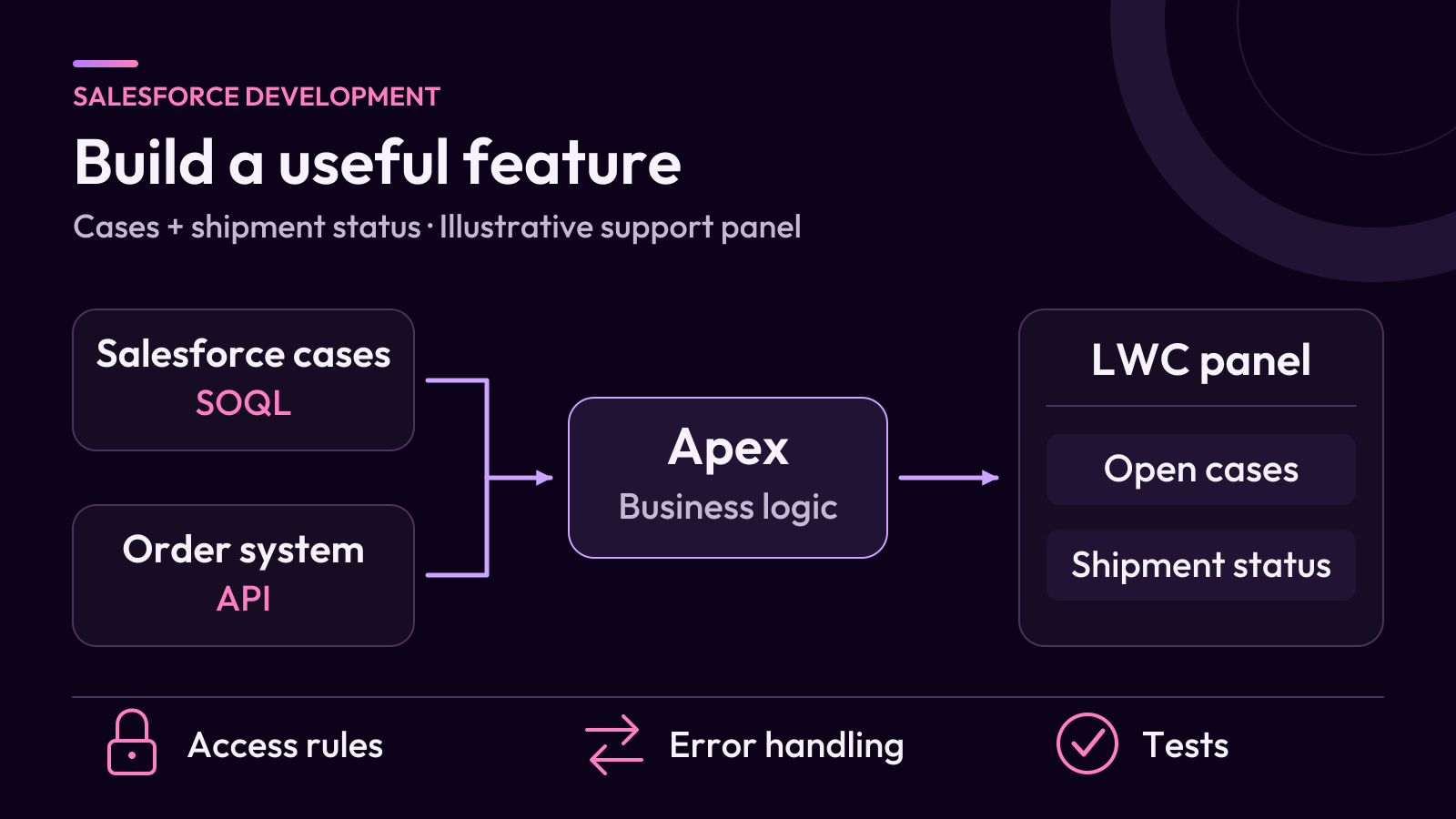
A Salesforce developer builds and maintains applications, custom features and integrations on the Salesforce Platform. The role often uses Apex for business logic, Lightning Web Components for user interfaces and SOQL to retrieve Salesforce records. Developers also test data access, handle errors and prepare changes for release.
For example, a developer might build a panel that shows a support agent the open cases for an account and the latest shipment status from a separate order system. The work includes choosing how to retrieve the information, deciding who can see it and handling cases where the order system fails to respond.
You may see the role called an SFDC developer in job descriptions. The responsibilities depend on the team and the applications it builds. Salesforce outlines the scope of the role in its developer career path.
What Does A Salesforce Developer Do?
A Salesforce developer turns a business requirement into a working feature that the team can support. The work usually involves some combination of these responsibilities.
- Design the solution. Review the requirement, the data involved and the features already available. Agree how the team will tell that the change works.
- Build business logic and interfaces. Write Apex for custom rules and processing, or create a Lightning Web Component for a task that needs a custom screen.
- Connect systems. Build or maintain integrations that exchange information with systems such as billing, order management or customer support.
- Protect data. Check which users can see and change records, fields and actions. Apply the required access rules throughout the feature.
- Test and release changes. Review the code, test normal and failure cases, and validate the release in a suitable environment before deploying to production.
On an existing system, a developer may spend a day tracing a failed integration, fixing an error in a trigger or reviewing what a proposed change would affect. Maintaining existing features is a regular part of the role.
Which Tools Does A Salesforce Developer Use?
The tool depends on the layer of the application you are changing. The table shows where common Salesforce development tools fit.
| Tool | What It Does | Example |
|---|---|---|
| Apex | Runs custom business logic on the platform. Apex basics | Validate a change or process a batch of records. |
| Lightning Web Components (LWC) | Builds interfaces with web technologies such as JavaScript, HTML and CSS. LWC developer guide | Display a case summary on an Account page. |
| SOQL | Retrieves Salesforce records, fields and related data. SOQL guide | Retrieve open cases linked to an account. |
| Salesforce Flow | Configures processes and automation through a visual builder. | Create a follow-up task when a case reaches a defined status. |
| Salesforce APIs | Allow applications to read, exchange or update information according to their access. | Send a customer update to an order system or retrieve shipment status. |
| Salesforce CLI and Git | Support development tasks and help teams track, review and deploy changes. | Put component changes in version control and deploy them to a test org. |
One feature can use several of these tools. For example, a component might display records from Salesforce and call an Apex service when it needs to combine those records with a response from an external system.
When Should A Salesforce Developer Use Flow Or Apex?
Start with the requirement and the automation already running on the affected object. A straightforward record update or notification may fit Flow. More complex logic, demanding workloads or reusable processing may call for Apex or a design that combines Flow and Apex.
For example, a Flow could create a follow-up task when a case is escalated. If an import processes many related records and the logic must coordinate several rules, the team should review the expected volume, existing triggers and maintainability before choosing an approach.
The developer and administrator should agree where the automation belongs and who will maintain it. Salesforce Architects describes how to make this decision for record changes in its record-triggered automation guide.
What Does A Salesforce Development Project Look Like?
Consider a support team that wants to see open cases and shipment status together on an Account page. This example shows how a developer can turn the request into a small, testable feature.
- Clarify the task. Agree which cases should count as open, which shipments matter, and what the agent should see if the order system is unavailable.
- Check the available features. Try a standard related list for the case records. If the workflow also requires the external status in the same panel, decide what needs a custom component and a connection to the order system.
- Define the data access. Show cases the agent is allowed to see. Check the account-to-order mapping and agree how the integration authenticates and which fields it may return.
- Build and test. Test an account with open cases, one with none, a user with restricted access and a failed shipment lookup.
- Prepare the handover. Record how the component works, where integration errors are logged and who owns maintenance after launch.
If two open cases are visible to an agent and a third is restricted, the panel should count two. If the shipment lookup times out, the case list should still display and the shipment area should show that the status is unavailable. Both outcomes give the team something specific to test.
How Do Salesforce Developers Test And Deploy Changes?
Developers typically work in a test environment and track changes in version control. The release process checks the feature against the agreed requirements before the team moves it to production.
- Test the behavior. Cover expected results, missing data and failure paths. For record-triggered logic, test a batch of records as well as a single update. Apex unit testing guidance
- Test the access rules. Check record, object and field access with representative users. Review the API version and access mode of Apex used by a component, since Salesforce documents different defaults across versions. Salesforce guidance on secure Apex classes
- Validate the release. Check dependencies, run the required tests and confirm the feature works with its surrounding configuration. Record the changes and the post-deployment checks. Salesforce testing and deployment guide
For a practical example of checking permissions, errors and test evidence before a release, see our review guide for AI-generated Salesforce code.
How Is A Salesforce Developer Different From An Administrator Or Consultant?
The roles often overlap. The distinction is the type of work each person usually owns.
| Role | Usual Focus | Example On The Support Panel Project |
|---|---|---|
| Salesforce developer | Custom logic, interfaces, integrations and technical testing | Build the component and handle errors from the order system. |
| Salesforce administrator | Configuration, user access and day-to-day operation | Configure profiles or permission sets and place the component on the right record page. |
| Salesforce consultant | Business requirements, solution decisions and adoption | Agree what agents need to see and confirm that the panel supports the intended workflow. |
One person may cover more than one role on a small team. For a closer look at discovery, requirements and user acceptance testing, see our Salesforce consultant role and career guide.
What Skills Does A Salesforce Developer Need?
Start with the platform concepts that determine how your feature will behave. Then practice the coding and testing skills required to build it.
- Data modeling. Understand objects, fields and relationships. Be able to explain why a record belongs in a particular object and how it connects to other records.
- Apex and SOQL. Write readable logic and queries. Learn how platform limits influence the way you handle large batches and repeated operations.
- JavaScript and LWC. Build interfaces that handle loading, empty results and errors as well as the successful response.
- Security and integrations. Understand record sharing and object and field permissions. Learn how authentication, timeouts and error handling affect system connections.
- Testing and source control. Use test cases, Git and a repeatable deployment process so teammates can review your work and reproduce the results.
- Communication. Explain technical choices in terms of what users need, what could fail and who will maintain the feature.
Do Salesforce Developers Need To Code?
Yes, most Salesforce developer roles involve coding. Apex is common for server-side work, and JavaScript is used for Lightning Web Components. Developers also use standard configuration and Flow where those tools fit the requirements. Review the job description to see which skills a particular team expects.
Which Salesforce Developer Certification Should You Start With?
Salesforce Certified Platform Developer is the foundational developer credential for building custom business logic and interfaces on Salesforce. You may see the older Platform Developer I name in study materials. The current credential page lists the exam coverage and preparation resources. Salesforce Certified Platform Developer
Use the exam topics to organize your learning alongside a project you can explain. A useful milestone is being able to show what you built, describe the tradeoffs and demonstrate how you tested it.
How Can You Start Learning Salesforce Development?
Pick one small business task and build it in a practice org with sample data. Trailhead provides an environment for hands-on exercises. Create a Trailhead Playground
- Learn the data model. Create a sample account and a few cases. Identify the fields a support agent would need.
- Build one useful feature. Start with a related list or report. If you want to practice development, build a small component that displays the open-case count and links to the relevant records.
- Test an exception. Try an account with no cases and a user with more limited access if your practice environment supports it.
- Document the result. Record the requirement, your design choice and the tests you ran. Keep screenshots or test notes that you can walk through later.
If you want a structured first exercise before writing custom code, work through our Salesforce practice app guide.