
Is Salesforce A CRM?
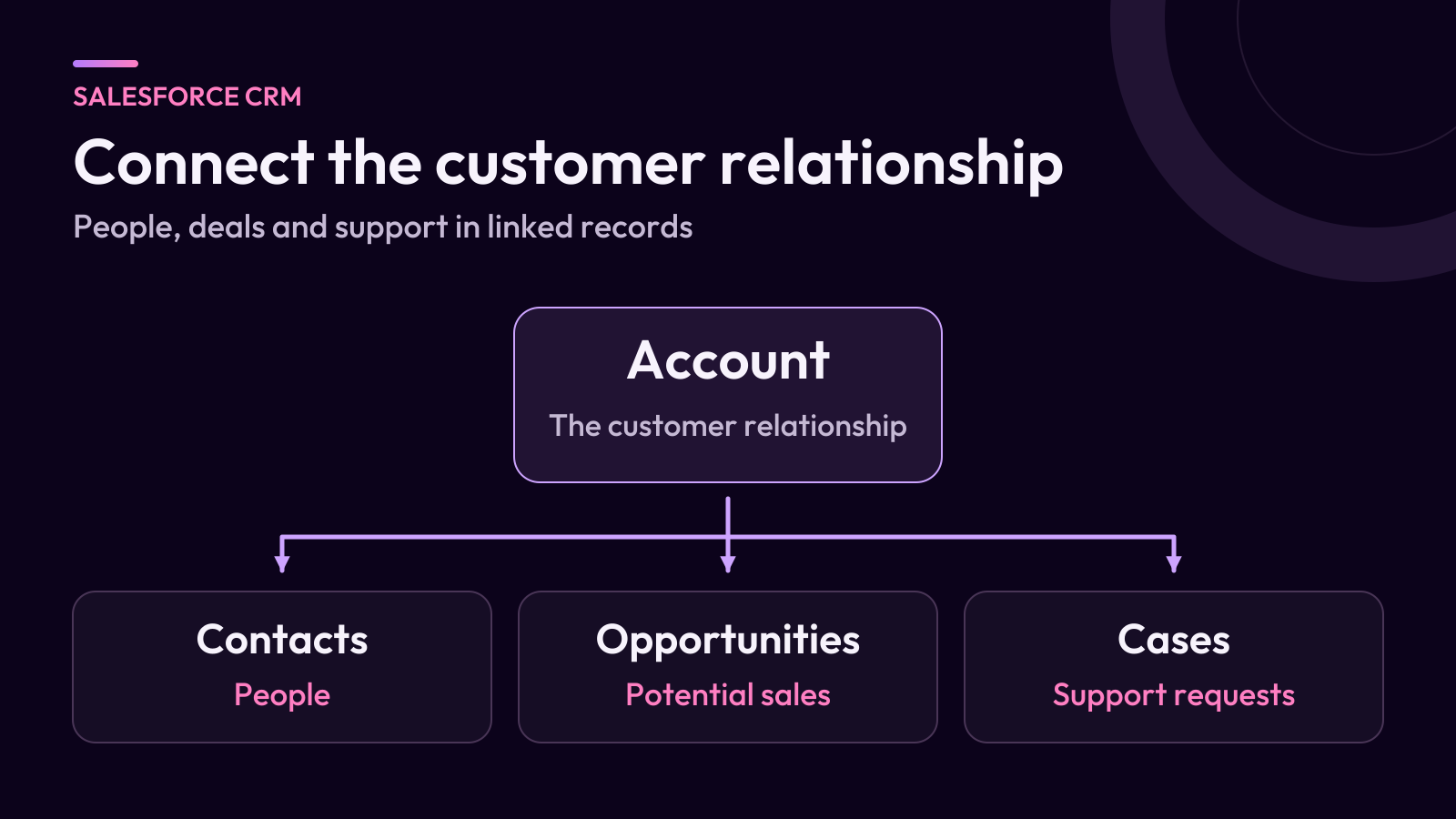
Yes, Salesforce is a cloud-based customer relationship management (CRM) platform. Businesses use Salesforce to manage prospects and customer accounts, track sales opportunities, and handle support requests. Sales Cloud supports sales workflows, while Service Cloud helps teams manage customer service.
A CRM becomes useful when people can see what has happened with a customer and what needs to happen next. For example, a salesperson can open an account to find an active deal, while a support agent with the right access can see the customer’s open cases. Both teams can work from connected records instead of reconstructing the history from separate inboxes.
What Does CRM Mean In Salesforce?
CRM stands for customer relationship management. It covers how a business keeps track of prospects, customers, and their interactions. CRM software gives teams a way to record those interactions, assign follow-up work, and report on what happens over time.
Salesforce, Inc. is the company. Salesforce CRM refers to the software businesses use to manage those relationships. The Salesforce Platform is the foundation that supports the applications, data, and customization. Salesforce’s fiscal 2026 annual report describes a wider portfolio that includes sales, service, marketing, commerce, analytics, and integration.
Which Salesforce Products Do CRM Teams Use?
Sales Cloud is Salesforce’s sales-focused CRM application. The broader Salesforce portfolio also supports service, marketing, and other work involving the customer relationship.
| Product | Typical Job | Example |
|---|---|---|
| Sales Cloud | Manage prospects, deals, and the sales pipeline. | A rep updates a deal’s stage, amount, and expected close date. |
| Service Cloud | Track service requests and coordinate their resolution. | An agent records a product issue, assigns the case, and tracks the response. |
| Marketing Cloud | Run campaigns and customer journeys using the features configured for the team. | A marketer sends a series of follow-up messages to an eligible audience. |
The product, edition, and configuration determine which features are available. A useful starting point is to list the tasks each team needs to complete, then map those tasks to the products and permissions the users need.
What Does Salesforce CRM Do Day To Day?
Salesforce CRM helps teams record customer interactions and act on them. The way people use the records matters as much as the fields available to them.
- Track follow-ups. A rep logs a conversation, records the agreed next action, and sets a due date. Someone covering that account can pick up the work when the rep is away.
- Manage a sales pipeline. A manager reviews which deals are open, how far they have progressed, and when they are expected to close. Consistent stage definitions and recent updates make the pipeline easier to interpret.
- Handle support requests. A team records an issue in a case, assigns an owner, and tracks its status until it is resolved. A case history helps the next agent see what has already been tried.
- Automate routine steps. A configured flow can create a follow-up task when an opportunity reaches an agreed stage. The team should also define what happens if the record is missing information the flow needs.
These jobs depend on the data users enter and the connections the business sets up. A forecast based on deals with overdue close dates will need attention even when the dashboard itself works correctly.
How Does Salesforce Organize Customer Information?
Salesforce groups similar records into objects. An Opportunity is one type of object. A particular equipment quote is a record in that object, and its amount or stage is a field on that record.
| Record | What It Represents | Example For An Equipment Supplier |
|---|---|---|
| Lead | A prospective customer or inquiry the team is evaluating | A maintenance manager asks for a replacement pump quote. |
| Account | The company or customer the team works with | The food manufacturer buying the pump. |
| Contact | A person connected to that customer | The maintenance manager handling the purchase. |
| Opportunity | A potential sale the team is tracking | The pump and installation deal, with a stage and expected close date. |
| Case | A customer question or issue the team needs to resolve | A request to confirm the delivery address after the sale. |
In a business-to-business setup, the account often connects the people, deals, and cases for a company. A qualified lead can be converted into an account and contact, and the team can choose whether to create an opportunity at the same time. Existing customer records can be reused when they match.
How Does Salesforce CRM Work In A Customer Journey?
Imagine an equipment supplier receives a request for a replacement pump. The following example shows how the work can move between sales, fulfillment, and support.
- Capture the inquiry. A rep records the request as a lead and confirms the customer’s company, contact details, and deadline.
- Qualify the request. The rep checks whether the manufacturer already has an account. Once there is a deal to pursue, the rep links the contact and opportunity to the right customer record.
- Track the deal. The opportunity records the agreed scope, amount, expected close date, and next action. The rep marks it won when the buyer confirms the purchase.
- Pass the order to fulfillment. A configured integration can send the approved details to the enterprise resource planning (ERP) system. The ERP creates the order and can return its order number to Salesforce.
- Support the customer after the sale. If the buyer asks where the pump is, an agent opens a case linked to the account. The agent can check the order’s latest available status if the ERP connection makes that information available.
The order number matters at the last step. A company may have several open orders, so matching the customer’s question to the account alone can pull the wrong delivery status. The integration should return the order reference and show when its status was last updated.
Is Salesforce A CRM Or An ERP?
Salesforce serves as the CRM in this example. It holds information about the customer relationship and the work of the sales and service teams. The ERP manages the operational and financial records for the purchase, including the order, stock, fulfillment, and invoice. Businesses can use both and connect the fields teams need to see.
| Question | Where To Look In This Example | Record Or Field |
|---|---|---|
| Did the buyer agree to purchase the pump? | Salesforce | Opportunity stage and close date |
| Has the pump shipped? | ERP or fulfillment system | Shipment status and tracking reference |
| Has the invoice been paid? | ERP or accounting system | Invoice balance and payment status |
| Has the customer’s delivery question been resolved? | Salesforce | Case status and resolution notes |
Decide which system can update each shared field. Salesforce can show a shipment status while the ERP remains responsible for updating it. That distinction keeps the support agent from relying on a manually edited status that no longer matches the warehouse record.
Is Salesforce A Cloud-Based CRM?
Yes. Salesforce is delivered as software as a service (SaaS), so users access it over the internet. The business still configures who can view or change its data. For instance, an agent may need an account’s contact details and order status, while access to sensitive fields is limited to people who need them for their work.
When Does A Team Need A CRM Like Salesforce?
A CRM is worth evaluating when sales, support, and operations repeatedly need to share customer information. Look for missed follow-ups, duplicate records, disagreement over deal stages, or reports that take hours to prepare because the data lives in several places.
Start by naming the problem and agreeing how you’ll measure it. A sales team might track the share of open opportunities with a current next action. A service team might track time to first response and check how often cases are missing an owner. Use the same definitions before and after rollout so the comparison reflects a change in the work.
If your current process consists of one person maintaining a short contact list, a simpler setup may already cover the need. As handoffs, access rules, or reporting requirements grow, use those requirements to evaluate which CRM capabilities are worth configuring.
What Should You Test Before Rolling Out Salesforce CRM?
Walk through one real workflow with sample data and the permissions that users will have in production. Ask the people who do the work to verify the results.
| Check | Evidence To Capture |
|---|---|
| A salesperson qualifies an inquiry from an existing customer. | The contact and deal are linked to the correct account without creating a duplicate. |
| A support agent opens the account after the deal closes. | The agent can find the relevant case and order reference, with access limited to the records and fields they need. |
| The ERP connection fails to refresh the shipment status. | The user can see that the status is stale or unavailable, and the integration owner can find the failed update. |
| A manager opens the pipeline report. | The agreed sample deals appear under the correct owners and stages. |
Keep the workflow, expected outcomes, and unresolved issues together. Those records give the team a way to confirm what was tested and repeat the checks after changes.
What Should You Decide Before Setting Up Salesforce CRM?
Pick one customer workflow and agree which team owns each step. Then decide what users need to see in Salesforce and which information should come from another system. If you’d like a second opinion on those decisions, iTeknologies can help you define the first release and the data it needs.