
What Is A Contact Key In Salesforce Marketing Cloud?
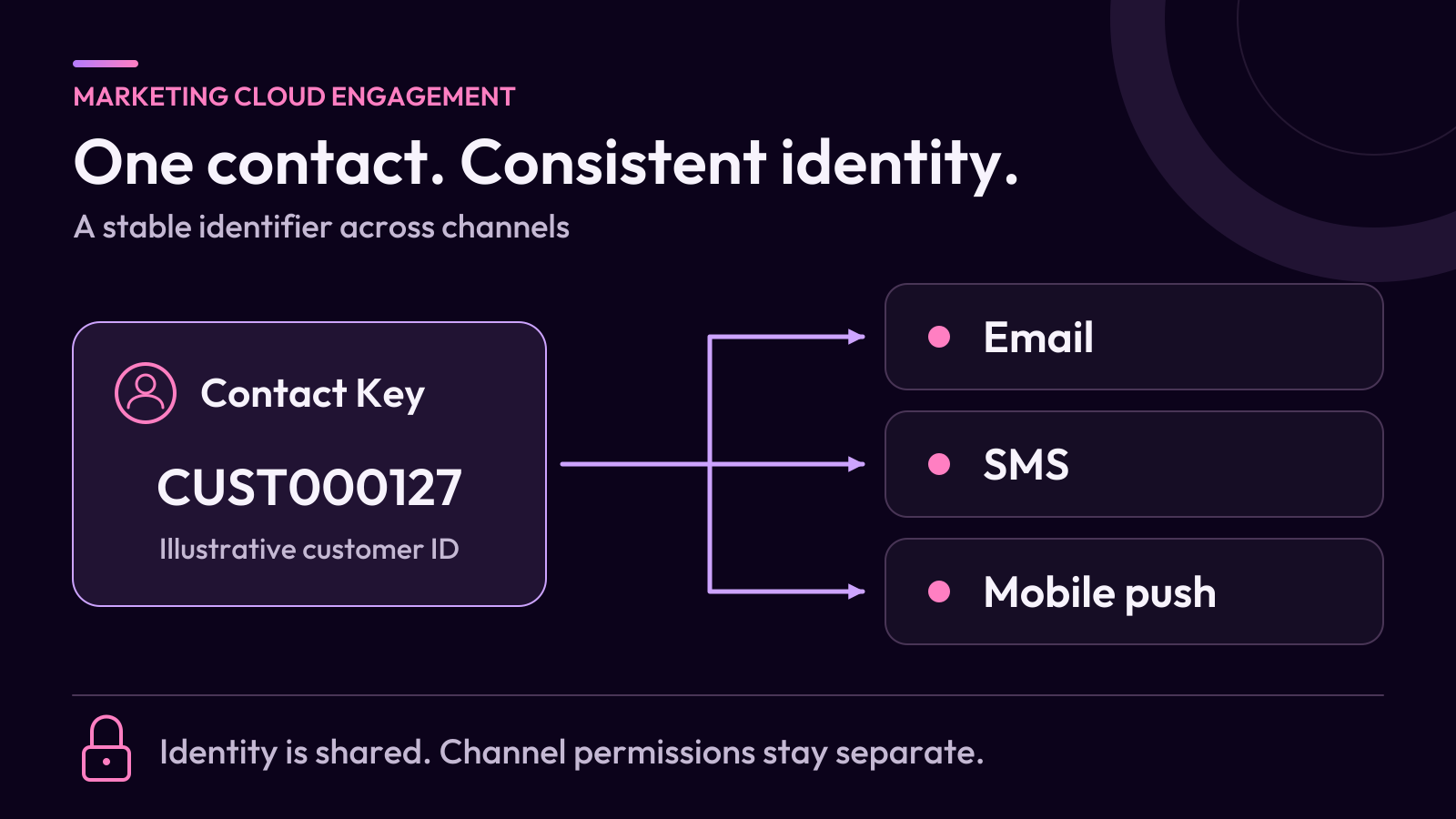
A Contact Key in Salesforce Marketing Cloud Engagement is a unique text identifier that connects a contact’s identity across channels such as email, SMS, and mobile push. In Email Studio, the same identity value is called the Subscriber Key. It helps associate channel addresses, interactions, and related customer data with the correct contact.
Salesforce explains this relationship in its guide to contacts and contact model relationships.
This guide focuses on Marketing Cloud Engagement, where Contact Builder, Email Studio, and Journey Builder use these identifiers. Choosing a consistent key matters when importing customers, connecting CRM data, or identifying someone who uses several communication channels.
How Are Contact Key, Subscriber Key, Contact ID, And Email Address Different?
Contact Key and Subscriber Key refer to the same identity value in different parts of Marketing Cloud Engagement. The other identifiers below have different jobs.
| Identifier | What It Identifies | Example Or Typical Use |
|---|---|---|
| Contact Key | A contact across Engagement channels | A stable customer identifier such as CUST000127 |
| Subscriber Key | The email subscriber identity that becomes Contact Key in Contact Builder | The same CUST000127 value in Email Studio |
| Contact ID In Engagement | An internal, system-generated contact identifier | Backend identification within Engagement |
| Subscriber ID In Engagement | An internal, system-generated subscriber identifier | Internal email subscriber references |
| Salesforce CRM Contact ID | A Contact record in Sales Cloud or Service Cloud | An 18-character CRM record ID used in relevant Marketing Cloud Connect workflows |
| Email Address | An email delivery destination | maya@example.com |
| Data Extension Primary Key | A unique row, or combination of fields defining a unique row, in a data extension | CustomerID in a customer table or OrderID in an orders table |
The phrase “Contact ID” needs context: an internal Engagement Contact ID and a Salesforce CRM Contact record ID are separate identifiers.
The distinction between contact identity and table rows becomes especially important when customers have multiple orders, subscriptions, or devices.
How Does A Contact Key Work Across Different Channels?
Imagine a customer named Maya who receives your emails and uses your mobile app. Your company assigns her the customer identifier CUST000127.
The following records are fictional examples.
| System Or Channel | Identity Value | Channel Information |
|---|---|---|
| Customer database | CUST000127 | Customer profile |
| Email Studio | Subscriber Key: CUST000127 | maya@example.com |
| Mobile app registration | Contact Key: CUST000127 | Registered device |
| Contact Builder | Contact Key: CUST000127 | Related channel information |
This consistent value lets Engagement associate the channels with the same contact.
If Maya changes her email address, the identity design should retain CUST000127 and update the relevant address data. Generating a new customer key for every email change would fragment that identity.
However, keeping the key consistent does not update every connected table or select a journey’s delivery address automatically. Your integrations and journey settings still need to handle those updates.
Our explanation of how Salesforce integration works provides useful background on moving customer data between systems.
What Should You Use As A Contact Key?
Use a stable identifier from the system responsible for customer identity. Depending on your architecture, that could be a CRM record ID, a customer database ID, or a generated identifier.
Salesforce’s Contact Builder best practices recommend a channel-independent value that remains consistent. Store it in a text field, including when its source is numeric.
Before selecting a key, answer these questions:
- Is it unique? Two different people must not receive the same identity value.
- Is it stable? An email change, purchase, or device replacement should not generate a new identity.
- Is it consistent? Imports, APIs, email audiences, and app registrations should use the agreed value.
- Is its format preserved? Converting
000127to the number127changes the identifier you transmit. - Can different sources collide? A customer number and an employee number might both be
127.
For multiple sources, define a mapping rule before importing. For example, independently assigned identifiers might map to CUST000127 and EMP000127. These are illustrative design choices; an existing CRM-connected implementation may already require another format.
Document which system creates the identifier and which team maintains the mapping.
Can You Use An Email Address As A Contact Key?
Salesforce advises against using email addresses as Subscriber Keys. Email addresses can change, and more than one person can share an inbox.
Its Subscriber Key documentation also explains that different Subscriber Keys can use the same email address. Matching email addresses therefore do not establish that records represent one contact.
For example, CUST000127 and CUST000128 may both use household@example.com. They remain separate subscriber identities. Your business rules must determine whether that represents two household members or an accidental duplicate.
How Does Contact Key Work With Data Extensions?
A data extension is a table. Its primary key identifies a row; Contact Key identifies the contact associated with relevant data.
Salesforce’s data model design guidance distinguishes these roles. The primary key can be the contact identifier, but it can also identify something else, such as a product.
Consider this customer table:
| ContactKey | EmailAddress |
|---|---|
CUST000127 | maya@example.com |
If the table contains one row per contact, ContactKey can serve as its primary key.
An orders table needs another structure:
| OrderID | ContactKey | OrderStatus |
|---|---|---|
ORD1001 | CUST000127 | Shipped |
ORD1002 | CUST000127 | Processing |
Here, OrderID can identify each row while ContactKey links both purchases to Maya. Making Contact Key the sole primary key would prevent this table from storing multiple rows for the same contact.
Two order rows do not inherently represent two contact identities. The relationship and the values used when creating contacts determine identity.
How Should A Sendable Data Extension Be Mapped?
For a Subscriber Key-based audience, select the field containing your agreed contact identifier as the send relationship:
Your ContactKey field → Subscribers on Subscriber Key
The column might instead be named CustomerID or SubscriberKey. Its label alone does not establish the relationship; check its contents and configuration.
Salesforce’s instructions for managing data extensions explain how to mark a data extension as sendable and select the subscriber relationship.
For the customer table above, verify that:
- The contact identifier uses a text field.
- The email destination uses the appropriate EmailAddress field type.
- The send relationship points to the identifier field.
- The primary key matches the table’s intended row structure.
How Does Journey Builder Use Contact Key?
Journey Builder uses the contact identity associated with its entry source. For a data extension entry source, the send relationship is central to identifying that contact.
If the entry source identifies Maya as CUST000127 but a related table links contacts using email addresses, a contact-data lookup may fail to find the intended record.
Salesforce documents this mismatch in its Journey Builder relationship troubleshooting guidance.
For an order journey, also distinguish the customer from the purchase. A decision about a specific order may need to match OrderID as well as the contact identifier. Otherwise, an eligible order elsewhere in that customer’s history can affect the result.
Two other settings need separate checks:
- Re-entry: A stable Contact Key can still enter a journey multiple times when the journey permits it.
- Delivery address: Keeping the same key does not determine whether a journey uses an entry-source email address or contact information.
Review Salesforce’s Journey Settings documentation when configuring repeat purchases, welcome journeys, and email changes.
What Changes When You Use Marketing Cloud Connect?
When Marketing Cloud Connect sends to CRM reports, campaigns, or Salesforce data extensions, the CRM identifiers matter.
Salesforce’s Marketing Cloud Connect Subscriber Key guidance explains that Contact, Lead, and User record IDs are converted to their 18-character form for the Subscriber Key used in those sends.
For these workflows, preserve the CRM identifier expected by the connector. Introducing an unrelated customer number can create a separate identity and interfere with CRM tracking associations.
This is a workflow-specific requirement. It does not mean every Marketing Cloud implementation must use a Salesforce CRM Contact ID.
What Happens When A Lead Becomes A Contact?
Lead conversion deserves an explicit test.
Salesforce states that when a converted lead’s Contact ID is sent to Engagement, a new subscriber with a new Subscriber Key is added. Tracking data, opt-out, and preferences are not automatically transferred to that new identity through this process.
The behavior is described in Salesforce’s Marketing Cloud Connect email sending documentation.
Include lead-to-contact conversion in your subscription and identity mapping design. Verify the resulting records before relying on the converted contact in production journeys.
Where Can You Find A Contact Key In Marketing Cloud?
Start in Contact Builder → All Contacts. Search for the exact Contact Key and open the record to review its channels and related information.
Salesforce’s instructions for viewing contacts explain the search and membership views. All Contacts availability can depend on business unit settings, so ask your administrator if that view is unavailable.
Then compare the same identifier across:
- Email Studio → Subscribers → All Subscribers, where the identity appears as Subscriber Key.
- The relevant data extension, including its send relationship.
- The journey entry source, where contact identity enters the workflow.
- The source system or integration, which supplies the identifier.
If a person appears in Contact Builder but not All Subscribers, check their source and channels. A contact record does not automatically mean an email subscriber record exists.
Can You Change A Contact Key Or Merge Duplicate Contacts?
Treat replacing an established Contact Key as an identity migration. Review connected audiences, integrations, subscriptions, and history before changing what a source system sends.
Assigning a new key does not automatically merge it with an existing contact. Contact Builder does not provide a general contact merge or deduplication function.
MobilePush has an important nuance: the SDK can register a device under a specified Contact Key. If none is supplied, it can assign a random GUID. Associating the device with a known user later can leave the previous contact disconnected from that device.
Salesforce’s mobile Contact Key strategy guide explains the choices for anonymous users, known users, and delayed registration.
Changing the device’s registered identity is different from combining two contacts’ complete history. Define how login, logout, and shared-device use should behave before implementing mobile registration.
How Does Contact Key Affect Unsubscribe And Consent Data?
Subscriber Key helps determine which subscriber record is updated when someone uses an email subscription center or unsubscribe link.
If one person accidentally has several keys, their records can develop different subscription states. Investigate all relevant identities and suppression rules when resolving that situation.
Channel permissions also remain separate. Salesforce’s omnichannel consent considerations distinguish email consent at the Subscriber Key level from SMS consent at the phone-number and keyword level. An email unsubscribe does not automatically represent an SMS or mobile push unsubscribe.
A useful implementation record should show:
- Which contact identifier a preference update applies to.
- Which channel or subscription the preference covers.
- Which system supplies and updates that preference.
A shared Contact Key supports consistent identity. It does not itself create permission to send messages.
What Should You Test Before Importing Or Updating Contacts?
Use fictional records or approved test contacts to check the complete path from the source system to delivery.
| Test Scenario | What To Verify |
|---|---|
| One person uses email and a mobile app | Both channels use the agreed contact identifier |
| An email address changes | The key stays stable and the intended address is used by each sending workflow |
| Two keys share an email address | The records remain separate; review whether that separation is intentional |
| Two people arrive with the same key | Source validation catches the identity collision before import |
| An identifier contains leading zeros | Export, transformation, and import preserve the complete text value |
| One person places multiple orders | Order rows remain distinct while referring to the same contact |
| A contact unsubscribes | Subsequent audience and sending tests honor the relevant subscription settings |
| A CRM lead converts to a contact | The new CRM identity and subscription handling behave as designed |
| An anonymous app user logs in | Device registration follows the chosen anonymous-to-known identity strategy |
Keep a small mapping document alongside these tests. Record the source identifier, Engagement field, data type, send relationship, update owner, and expected result.
This makes later troubleshooting repeatable when a new integration or audience is introduced.
What Other Contact Key Questions Do Marketers Ask?
Is A Contact Key Always A Salesforce Contact ID?
No. A Contact Key can come from another customer system. The Salesforce CRM record ID is especially relevant to Marketing Cloud Connect workflows that depend on CRM identities.
Can Two Contacts Have The Same Email Address?
Yes. Different Subscriber Keys can use the same email address. Review whether those records represent separate people or duplicated identities before changing them.
Does A Contact Key Prevent Every Duplicate Send?
No. A consistent key reduces identity fragmentation, but journey re-entry, audience design, and multiple subscriber identities can still affect message frequency. Test the specific sending workflow.
How Can You Keep Contact Identity Consistent As Your Systems Grow?
Choose the identifier before adding more imports and channels, then make every source follow the same documented mapping. Recheck that mapping when introducing CRM synchronization, app registration, or a new customer database.
If you need help tracing identifiers between Salesforce and your connected applications, explore iTeknologies’ Salesforce integration and automation services. A review of the data flow can help you identify where inconsistent keys enter the process.