
What Salesforce Integrations Do Financial Services Firms Need?
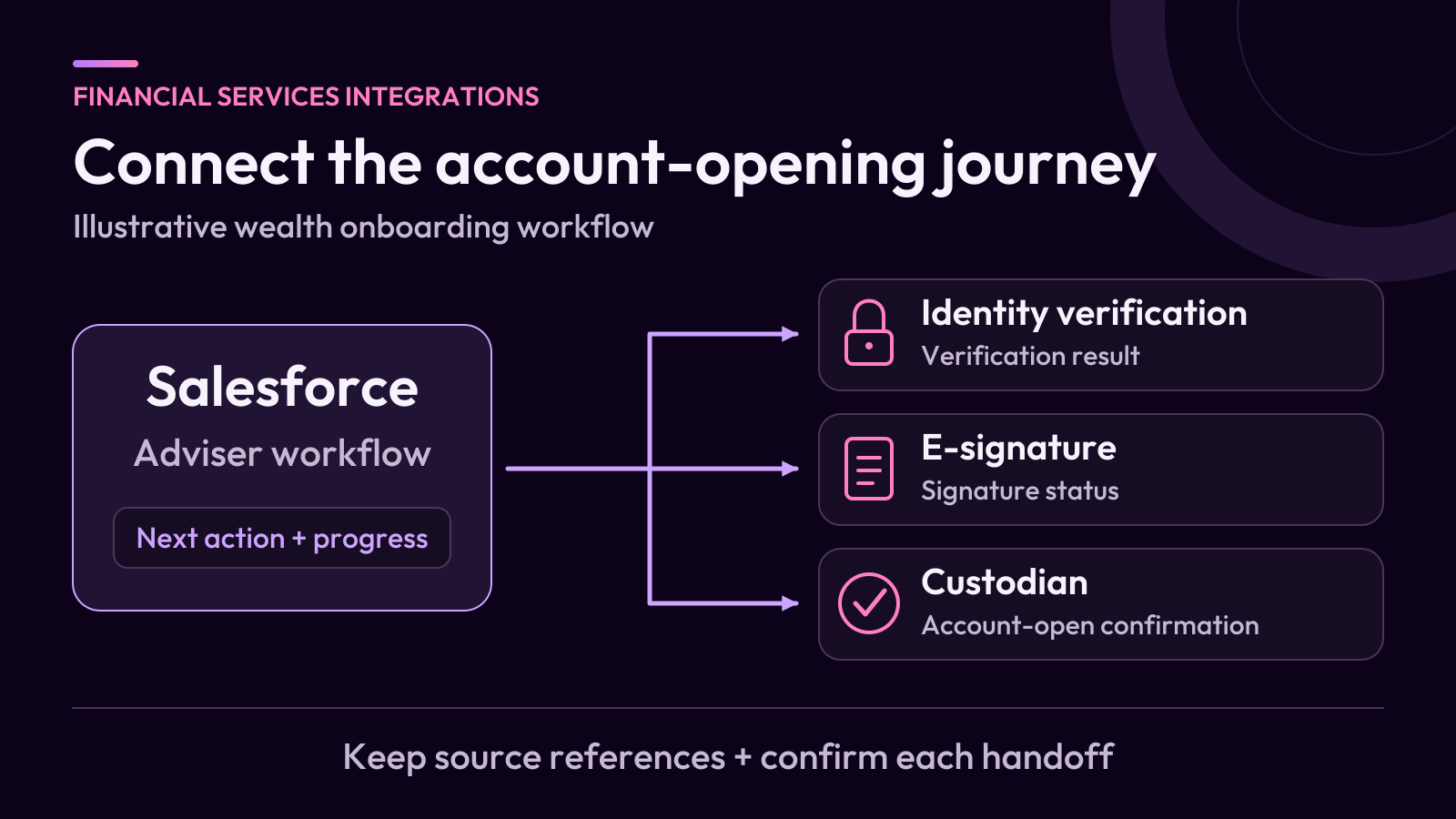
Financial services firms usually need to connect Salesforce to identity verification, document and e-signature tools, and the systems that manage their financial products. That means core banking for banks and credit unions, custodians for wealth managers, loan origination and servicing for lenders, and policy administration and claims for insurers. Start with the connection that closes a gap in a specific workflow, such as confirming an account is open or showing a borrower where an application stands.
The most useful design decision is which system has the final say on each piece of information. Salesforce can tell an adviser what to do next, while the custodian confirms whether an account exists and when it opened. Making that distinction early helps you avoid displaying an application as complete when the back-office work is still pending.
Which Salesforce Integrations Should Each Type Of Firm Prioritize?
Choose the first connection by the question staff struggle to answer during onboarding or servicing. Here are four common starting points.
| Firm Type | First Connections To Evaluate | What Staff Should Be Able To Confirm |
|---|---|---|
| Banks and credit unions | Core banking for customer and product lookups. Identity verification and document tools if opening accounts is the bottleneck. | Which accounts the customer holds, whether the account is active, and when a displayed balance was current. |
| Wealth managers and advisers | Custodian or portfolio platform for account and holdings data. E-signature and verification for onboarding. | Whether a custodian opened the account, which assets have arrived, and the date of the latest holdings snapshot. |
| Lenders | Loan origination system (LOS) for applications and milestones. Loan servicing for post-funding questions. | What is holding up the application, whether the loan funded, and which system has the current payment status. |
| Insurers | Policy administration for coverage and renewals. Claims and billing connections based on the most common service requests. | Whether coverage was in force on the relevant date, where a claim stands, and who owns the next action. |
A servicing team that spends every call looking up policy numbers may get more from a read-only policy connection than from a new onboarding workflow. Salesforce’s industry offering supports different data models for banking, wealth, lending, and insurance. Salesforce financial services data models
One lending process can need several connections. In its account of the 2020 Paycheck Protection Program rollout, Mascoma Bank described using MuleSoft to connect Salesforce to its core banking system and building a separate connection to the U.S. Small Business Administration’s loan processing system. The bank’s own records and the external submission each needed a distinct connection. Mascoma Bank’s account of the rollout
What Data Should Each Connected System Own?
Assign authority at the field level. On one Salesforce screen, the CRM may own the next follow-up, the signature provider may own envelope status, and a core or custodian system may own the account opening date.
| Connection | What Salesforce Users Typically Need | Where To Verify The Authoritative Record |
|---|---|---|
| Customer identity or master data | A stable customer reference, permitted contact details, and the relationship between the customer and product | The customer master or designated source for that field |
| Identity verification and KYC workflow | Approved status, case reference, time of last check, and assigned follow-up when review is needed | The verification provider for its result and the approved compliance workflow for the firm’s decision |
| E-signature and document storage | Envelope reference, required signers’ completion status, and an access-controlled link to the signed version | The signature provider for envelope events and the approved repository for the retained document |
| Core banking, custody, or portfolio data | Masked account reference, product, status, and permitted balances or positions with an as-of date | The core banking or custody system for posted records. The designated reporting system may own calculated portfolio values. |
| Loan origination and servicing | Application reference, document checklist, milestone, and servicing reference after funding | The origination system for the application, the designated decision system for the decision, and loan servicing for repayment. |
| Policy administration, billing, and claims | Policy term and status, approved billing information, and claim status | The policy system for coverage, the billing system for payment status, and the claims system for the claim record |
| Communications archive | A reference to retained messages or call records when staff need to find them | The firm’s approved archive for the retained record |
Map Know Your Customer (KYC) and identity checks separately if they represent different decisions. A provider’s identity result can be one input to onboarding. The firm’s approved process decides whether other checks or human review are needed. If the workflow includes periodic reviews, agree who owns the due date and what should happen when a check is overdue. Share only the result and evidence reference a user needs for their role. Keep identity documents and restricted anti-money laundering (AML) investigation details in the systems approved to hold them.
Match records with stable IDs. A person can hold multiple accounts, and similar account numbers can exist at different providers. Combining a source identifier with the source’s record ID gives the integration a better match than a name or email address alone. Route uncertain matches for review so the wrong person’s product details do not appear on a customer record.
How Does Financial Services Cloud Fit Into The Integration?
Salesforce now calls Financial Services Cloud Agentforce Financial Services. It provides an industry data model for relationships and financial products. For example, the standard model can use a Financial Account record for a bank or investment account and a Financial Account Party record to show how a client is linked to it, such as an owner or beneficiary. Salesforce’s introduction to the Financial Services Cloud data model
Confirm what your Salesforce org actually uses before mapping fields. An existing implementation may use managed package objects, while a newer setup may use standard objects. Document where each client, product, and relationship should map, then test a joint account to make sure the integration preserves both parties and their roles. Salesforce implementation design considerations
When Should You Sync Financial Data Or Look It Up On Demand?
Choose the transfer method based on the decision staff need to make and how old the data can be when they make it.
- On-demand lookup. Retrieve a balance when a service agent needs it, if the source and connection support the lookup. Label the type of balance, such as current available balance or last statement balance. Show the source timestamp and tell the agent when the source is unavailable.
- Scheduled feed. Load an approved custodian’s end-of-day positions for a review meeting. Each snapshot should show its business date, and the integration should flag a missing or incomplete file.
- Event update. Update Salesforce when a signed document is complete or an application moves to a new milestone. Handle repeated and out-of-order messages so an old update cannot replace a newer confirmed status.
- Controlled write. Send a request to open or update a product after the required approvals. Use a stable request reference, record the response, and verify whether the product system accepted the request before resubmitting after a timeout.
Some data can be displayed through a supported external lookup without keeping a local copy. If Salesforce needs a copy for reporting or work queues, store the smallest set of fields that supports that task and include the source timestamp. Salesforce’s data integration decision guide
For the mechanics of APIs, connectors, and background jobs, see our Salesforce integration guide.
What Does A Wealth Account Opening Integration Look Like?
In this illustrative workflow, an adviser starts a new investment account application in Salesforce. The firm uses separate verification, e-signature, and custodian systems. Salesforce gives the adviser a work queue and a view of progress. The example assumes the custodian can identify an application by the firm’s original request reference.
- Start the onboarding record. Salesforce assigns a reference, such as
ONB-1042, and links it to the client and the type of account requested. - Track the verification outcome. An approved provider returns a reference and a result of
Review required. Salesforce assigns a task to the authorized team and waits for the firm’s approved workflow to clear the review. - Track signatures. The signature provider reports when the required signers complete the package. The signed version is retained in the approved repository and Salesforce records its reference.
- Submit the approved package. The custodian receives the request under
ONB-1042and returns an application reference. The adviser seesSubmittedwhile processing continues. - Confirm the account opening. When the custodian returns
Openedand a financial account identifier, Salesforce updates the onboarding record. The adviser can now see the confirmed account alongside the next service task.
Agree the expected result for each exception before anyone builds the connection.
| Test Scenario | Expected Result |
|---|---|
| The identity result requires review. | The record enters an authorized review queue. No submission goes to the custodian until the required approval is recorded. |
The custodian accepts ONB-1042 but the response times out. | Operations finds the existing submission by its reference. Automatic retries are limited to requests for which the provider supports duplicate prevention. |
The Opened confirmation is delivered twice. | The CRM has one linked account record, and the handoff task is created once. |
An older Submitted update arrives after Opened. | The CRM retains the newer confirmed state. If the message order is uncertain, the integration checks the custodian’s current state. |
| A user lacks permission to view the retained document. | The repository denies access, and Salesforce exposes only the fields that user can see. |
Run the tests with synthetic records. Compare the source record, CRM state, and the integration’s request history after each test. A green connector status tells you the connection answered. The records show whether the intended business action happened. Salesforce integration patterns and duplicate handling
What Controls Should Financial Services Firms Build In?
Document the connection alongside the workflow it supports. For each exchange, name an owner who can explain the permitted data, expected timing, and recovery steps.
- Access. Give each integration identity only the records, fields, and actions required for its job. Use approved credential storage and test access with the roles that will use the integration.
- Data handling. Agree where sensitive records are stored, which fields can travel to Salesforce, and who may see them. Keep personal data out of routine error logs where request references are sufficient to investigate a failure.
- Traceability. Record the source, destination, request ID, timestamp, and outcome. Make it possible to tell which system provided a status and what the team saw when it acted.
- Reconciliation and recovery. Compare expected records and statuses with what arrived. Assign someone to review unmatched records, missing feeds, and repeated failures. Document how to replay eligible items without creating duplicates.
- Vendor oversight. Confirm what the provider can report during an outage, who can help recover records, and what happens to the data if the firm changes vendors.
In the U.S., SEC Regulation S-P applies to covered institutions such as broker-dealers and SEC-registered investment advisers. The amendments address written incident response procedures for unauthorized access to or use of customer information and oversight of service providers. Ask the team responsible for compliance to map the integration to the rules and policies that apply to the firm. SEC Regulation S-P final rule
For supervised U.S. banks, separate interagency guidance addresses third-party risk across planning, due diligence and selection, contract negotiation, ongoing monitoring, and termination. That guidance gives banking teams a way to evaluate a connector or middleware provider throughout the relationship. Federal banking agencies’ third-party risk guidance
What Should Your Firm Integrate First?
Pick one question staff answer repeatedly with a spreadsheet, email, or a second system. Write down the source field, who needs to see it, how fresh it must be, and the result staff expect. A lender might start with one origination status feed so staff can reliably say which applications are awaiting documents and who owns the next follow-up.
Measure the workflow before rollout. Track how long it takes staff to find the answer, how often the CRM is missing a source reference, and how many records need manual follow-up. Run the same checks after the pilot. Add a second connection when you can show what work it will remove or what decision it will improve. Our Salesforce implementation planning guide
Do You Need MuleSoft To Integrate Financial Services Cloud?
MuleSoft is one option when a firm needs to coordinate multiple systems, transform data, or manage errors centrally. A supported vendor connector or an existing integration platform may cover a smaller workflow. Salesforce provides MuleSoft templates for some financial services use cases. Check the template’s scope against your own provider, fields, permissions, and recovery requirements. Salesforce’s MuleSoft direct integration documentation
Can Salesforce Connect To Multiple Custodians?
Yes, if the custodian or an approved aggregator provides a supported connection or feed. Define a common set of account and holding fields, preserve the original provider and as-of date, and keep each provider’s record ID. Two feeds can report different valuation dates or settlement states, so agree which figures your users may compare and how to label them.
What If Your Core System Provides A File Feed Instead Of An API?
Use the vendor’s supported export and an approved transfer method if the workflow can work with scheduled updates. Check the file’s business date, expected record counts, and any rejected rows. Show the last successful refresh so staff know when to verify a value directly in the source system.
How Can You Turn The Integration List Into A Project Scope?
Bring one workflow, the systems involved, and a sample of the fields you need to exchange. Use it to agree where the data lives, what counts as a successful handoff, and how the team will spot a failed one. If you’d like help working through those decisions, iTeknologies can help scope the first connection.